

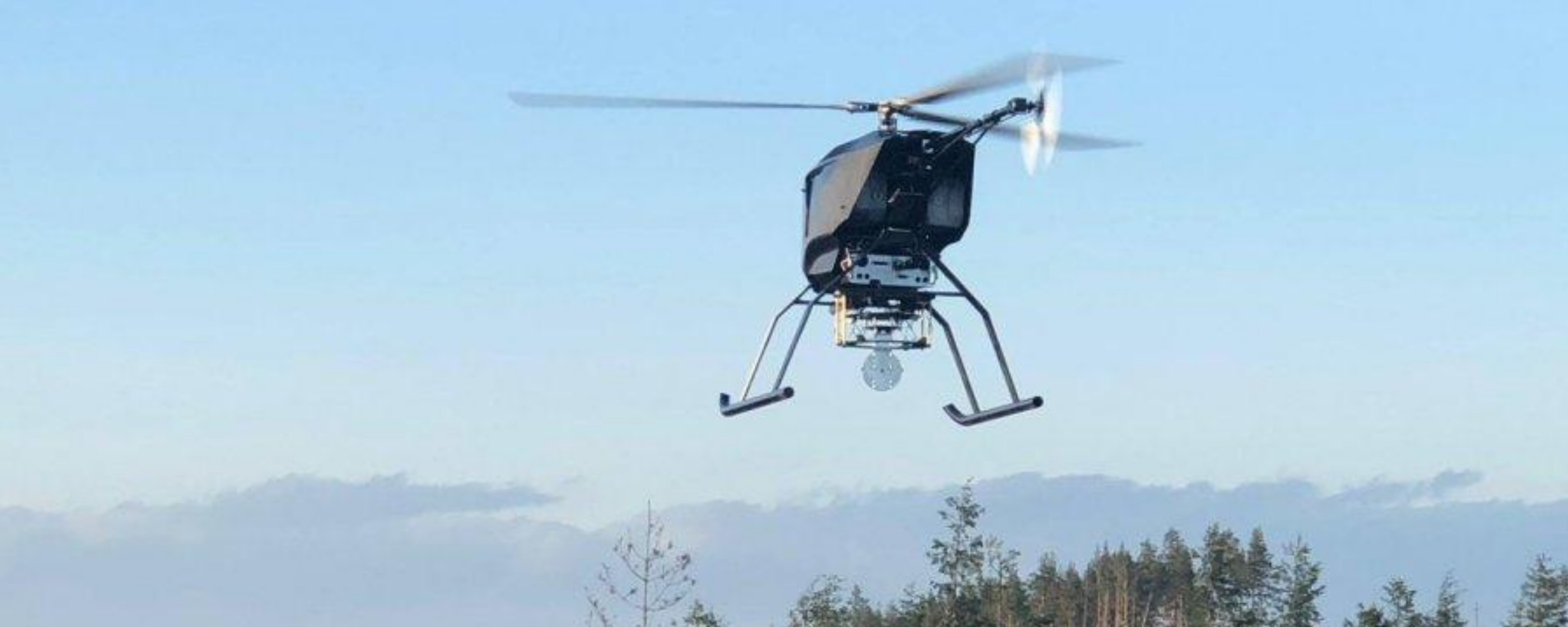
Unmanned aviation
The flying of drones is becoming increasingly popular among amateur and professional pilots alike, and drones share the same airspace with aircraft and helicopters.
In addition to the immediate vicinity of airports, there are various areas all over Estonia where different rules apply, and it is essential to comply with them to ensure safety both in the air and on the ground. Estonian Drone Map displays the drone operation rules applicable in Estonia and enables the coordination of drone flights with Lennuliiklusteeninduse AS in the vicinity of Tallinn Airport.
The rules applicable to drones are available on the website of the Transport Administration: https://transpordiamet.ee/en/drones. Drone Map is available online at utm.eans.ee/ and both Apple and Android mobile apps.
Seven steps for using Drone Map:

Once you have created an account, you can register drone flights and request take-off clearance.
You do not need to be logged in to view the Drone Map. However, it is recommended to do so and to submit a operation plan for your flight. This helps raise awareness of what is occurring in the airspace. In order to create an account, first visit utm.eans.ee/
Authentication and login
- Authentication is required to submit a flight activity plan or to modify data in the user profile.
- Estonian citizens are authenticated using Smart-ID and Mobile ID.
- Entering the Drone Map application via e-mail (i.e. username and password) is intended to be used only for exceptions: non-citizens without an Estonian ID-card.
Creating a pilot account
- After authentication, sign in with Smart-ID or Mobile ID. Your contact details will be requested when you first sign in. Please fill in the required fields.
The certificate of remote pilot competency must be uploaded to the Drone Map application. You can find your remote pilot ID and certificate of competency in the
Aviation Safety Supervision Information System (LOIS) of the Transport Administration (lois.transportamet.ee).
- You also need an operator account for flight.
2. Create an operator account or join another operator

- You can register your own operator account on the “My Account” page or the “My Profile” page.
- Select whether you are representing a private or legal person and fill in the required fields. You can find your operator registration number and operator registration certificate in the Aviation Safety Supervision Information System (LOIS) of the Transport Administration (lois.transportamet.ee).
- You do not need to create a private operator account if you do not fly private flights and use a legal entity operator account. A legal person can connect other pilots to their operator account.
3. Check airspace rules
Click on the map at the location where you are planning to fly the drone. You are able to view the altitude restrictions and other applicable operating conditions in the area that you need to take into account when planning your flight. Make sure you are allowed to take off in this location and that you have all the required permits and authorisations.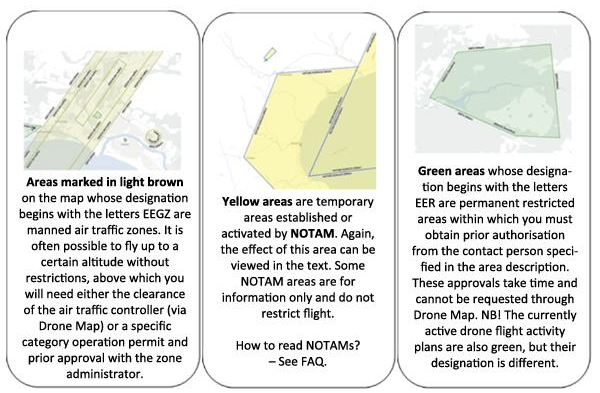
Please note that the methods for applying for the required authorisations may vary from one geographical area to another.
More information on the different geographical areas can be found here: https://transpordiamet.ee/en/aviation-and-aviation-safety/flying-drones-estonia/geographical-zones: https://transpordiamet.ee/lennundus-ja-lennuohutus/droonidmehitamata-ohusoidukid/geograafilised-alad
4. Prepare a flight activity plan
In the Drone Map application, you can submit an operation plan with a maximum duration of four hours. The maximum dimension of the flight activity plan is 1,000 metres, but the range of your flight in the open category depends on the VLOS conditions (see more: FAQ).
Open category conditions:
- There is no obligation to submit an operation plan when flying a drone in the open category (except at heliports). However, we recommend that you do so for safety reasons, so that other remote pilots are aware of your flight.
- You can submit an operation plan up to 7 days before your planned flight.
Drone flights at heliports near Tallinn:
- In order to fly at heliports, you must always submit an operation plan and request take-off clearance.
- You can submit an operation plan up to 7 days before the planned drone flight, but it must be done at least 15 minutes before take-off.
- Instructions on how to proceed at other heliports can be found here: https://transpordiamet.ee/en/aviation-and-aviation-safety/flying-drones-estonia/geographical-zones
Flights above open category operating limits::
- These flights are subject to mandatory submission of an operation plan and require specific category operational authorisation. You can find information on specific category flights on the website of the Transport Administration: https://transpordiamet.ee/en/aviation-and-aviation-safety/flying-drones-estonia/specific-category-flights
- You can submit an operation plan up to 7 days before the planned drone flight, but it must be done at least 15 minutes before take-off.
5. Apply for take-off clearance
- When it is time to take off (up to 1 min before), select your operation plan and tap
 . Do not take off before you have clearance.
 - 2. However, if the airspace is not vacant at the scheduled time, the air traffic controller will send you a notification via Drone Map and information to be used as the basis for resubmitting the operation plan. In order to resubmit, select the existing flight activity plan and tap
 .
.
6. Flight
The rules applicable to drones are available on the website of the Transport Administration: https://transpordiamet.ee/en/drones.
- Make sure that there are no people in the immediate vicinity of the take-off area who could get in the way of the drone and that the take-off area is clear of obstacles (including other drones).
- When flying in the open category, the drone must be in the line of sight, i.e. visible to the eye, throughout the entire flight.
In order to ensure safety, the air traffic controller may contact you. For this purpose, remain available via Drone Map and phone. Make sure the necessary notifications and sounds are enabled on your phone in case you need to be contacted or if the air traffic controller sends you a notification.
- If the air traffic controller sends you a notification via Drone Map, you must tap
 when you receive it.
 - If the air traffic controller cannot contact you via Drone Map, they may call you.
If the drone flies out of control, contact the air traffic controller immediately on +372 6 258 260 and give the following information: which direction the drone flew at, maximum flight time remaining based on battery life, and maximum speed of the drone.
7. Close the flight activity plan
- After landing or in order to cancel your flight, make sure to tap

- If you have submitted an operation plan but do not wish to fly, tap

Please note – GPS interference!
GPS interference can occur in Estonia, especially on the eastern border, which can cause you to lose control of your drone.
KKK
Kuidas saada luba Tallinna Tornilt?
Tallinna Tornilt saab õhkutõusu luba taodelda droonikaardi kaudu, kui oled eelnevalt esitanud lennutegevuse plaani. Telefoni teel kontakteeru torniga ainult eriolukorras või kui droonikaart ei toimi.
Mis on NOTAM?
NOTAM tähistab terminit Notice To Airmen ehk lennutegevusega seotud personalile mõeldud teateid. NOTAM-teated on kohustuslikud kõikidele pilootidele (nii mehitatud kui ka mehitamata pilootidele, sh lennutades droone avatud kategoorias). NOTAM-teated leiad siit: https://aim.eans.ee/notampib/notampib.pdf
Kuidas lugeda NOTAM-eid?
NOTAM-teated sisaldavad paljusid luhendeid. Nende mõistmiseks palume tutvuda AIP 1. osa (GEN) alaosaga GEN 2.2., mille leiad siit: https://aim.eans.ee/et/eaip. Droonikaardil kuvatakse kõik NOTAM-id vähemalt kõrguseni 1000 jalga.
NOTAM sisaldab NOTAM-i ID-d,
- kirjeldust,
- piirangu lennukõrgust (nt SFC-FL055)
- kehtivuse ajagraafikut (nt 04 1309-1500, 05 06 07 0700-1500),
- algus- ja lõpuaega (nt 3.2.2025 09:00 – 28.2.2025 18:00).
SFC tähendab maapinda ja FL lennutasandit (FL055 tähendab kõrgust 5500 jalga).
Mis on lennutegevuse plaan?
Läbi droonikaardi esitatav info, mis sisaldab planeeritud droonilennu asukohta, kõrgust, aega ning infot kaugpiloodi ja drooni kohta.
Mis on VLOS ja BLOS?
VLOS on Visual Line of Sight ehk visuaalne otsenähtavus. VLOS on avatud kategooria reeglite järgi lendamise nõuetest. Droonidele kehtivad reeglid leiad Transpordiameti kodulehelt: https://transpordiamet.ee/droonid.
Mis on käitaja, miks mul seda vaja on ja kus ma selle teha saan?
Infot sellest leiad Transpordiameti kodulehelt: https://transpordiamet.ee/lennundus-ja-lennuohutus/droonidmehitamata-ohusoidukid/kaitajaks-registreerimine
Sain teate "Your account has been suspended."
See tähendab, et käitajakonto registreerimisdokumendi kehtivusaeg on läbi. Seda saab uuendada, valides paremalt "Käitajakonto". Edasi liikuda valiku "Registreering" alla, kus saab uuendada käitaja registreerimisdokumenti ja kehtivusaega.
Support
For feedback and support (including in case of problems), please contact utm [at] eans.ee
If Drone Map is not available for submitting an operation plan, but you wish to fly in the Tallinn Airport vicinity above the limits for open category operations or in geographical areas established in the vicinity of heliports, please contact the air traffic controller on +372 6 258 260.